
The maturity model process - SURVEY
During the SURVEY step, each team member provides ratings and comments for each area within a dimension, for all maturity model dimensions.
Use this step to:
- collect individual ratings across key team health dimensions
- capture honest input through anonymous submissions
- measure current team sentiment against previous sessions
- track response progress for each participant
- optionally use a countdown TIMER to keep the meeting on schedule

These responses can be anonymous either by creating an ANONYMOUS meeting or enabling SURVEY RESPONSES ARE ANONYMOUS.

The SURVEY step is enabled by default and cannot be disabled in a maturity model meeting.
To prevent group-think, ratings will not be revealed until the meeting is moved to the DISCUSS step.
Understanding maturity model health dimensions
-
Maturity model dimensions are defined as part of a health model that may be used in multiple health check meetings, allowing you to track changes over time. You can switch or customize your health model via your team page or when setting up your meeting (Learn more).
- Once all participants are complete, the facilitator can move to the DISCUSS step.
Tracking participant progress
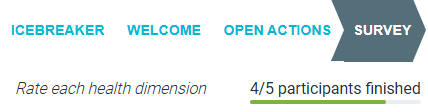
- You can keep track of team member progress by watching the progress bars shown beneath each participant's name in the TEAM side pane.

-
Or in the meeting header, where the number of completed participants is shown.
Using the timer
- If you'd like to timebox the SURVEY, use the countdown TIMER available through the stopwatch icon in the top-right corner of the screen.


- When time runs out, the timer turns red and sounds an alert to indicate time is up.
