
Insights - estimations
Cross-Team Insights and reports are available only on an Enterprise plan.
Gain insights into your team's estimations and identify areas for improvement or success over a selected timeframe.
How to access Estimation Insights
- Navigate to your organization, then INSIGHTS —> ESTIMATIONS.
- For team-level estimations insights, navigate to your TEAM —> INSIGHTS —>ESTIMATIONS.
- In the top right-hand corner, you can use the FILTER to choose your timeframe and teams.
Key metrics

- Estimations - Displays the number of estimations conducted based on the selected time frame.
- Actions - Shows the average number of actions created and committed from each estimation meeting.
- Participation rate - Shows the percentage of invited team members who were engaged in the meeting (i.e. added an idea, comment, vote or proposed an action). This excludes team members who were invited but never joined the meeting.
Check in/out questions
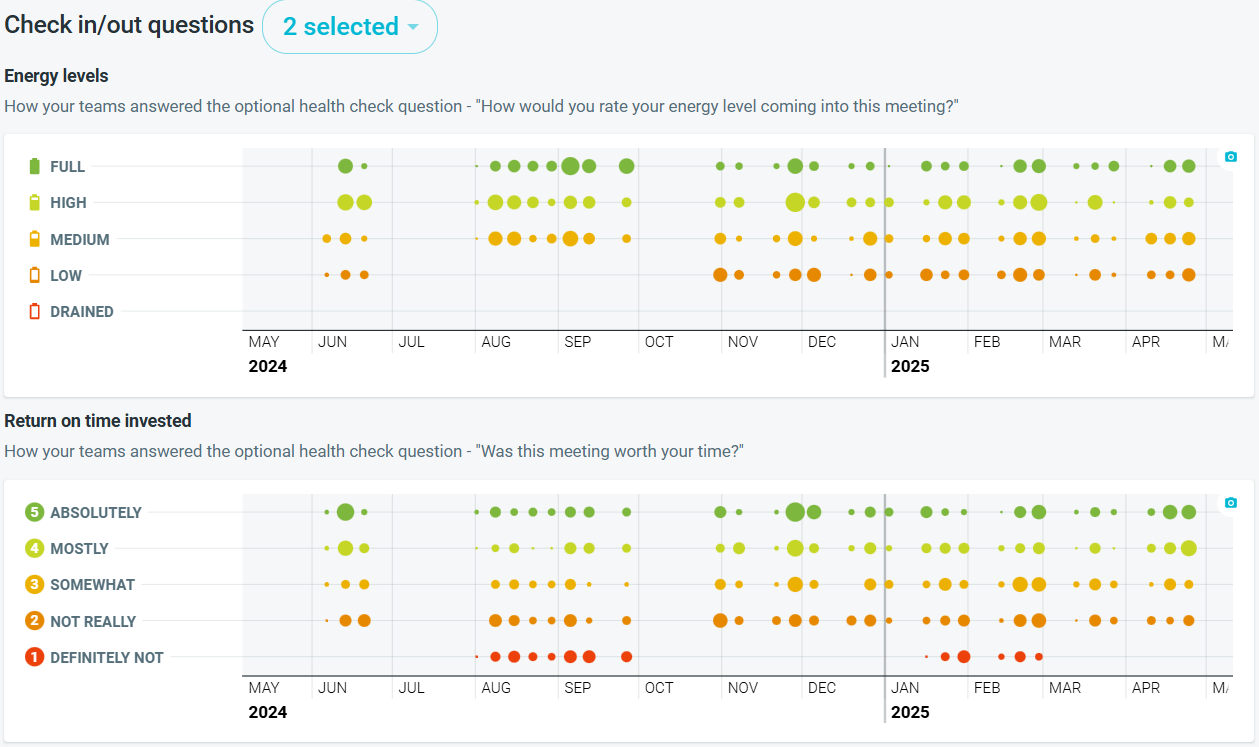
- Displays the trends from participant ratings for different check in and out questions used in estimations meetings, if used.
- Select the Check in/out questions you wish to explore. The chart will update to reflect the question chosen.
- The size of the circle indicates the number of responses received so the larger the circle, the greater the number of responses.
- HOVER over the timeline to get a breakdown of responses for the questions as needed.
- Click on the CAMERA icon to download an image of the chart.