
Webhooks
The Webhook integration lets TeamRetro send real-time HTTP notifications to any URL you control whenever events happen in a team — actions are created or completed, retrospectives finish, agreements change, and more. Unlike a Slack or Microsoft Teams integration that posts a human-readable message, webhooks deliver structured JSON, so you can wire TeamRetro into your own tooling, internal services, or automation platforms (Zapier, n8n, Make, custom Lambdas, etc.).
Requirement: Only TeamRetro Account Admins or Team Administrators can configure this integration. The webhook integration must also be enabled on your account's plan.
Where to find it
Webhooks are configured per team, so each team can send events to its own endpoint.
- Go to Team → Settings → Integrations.
- Find the Webhook card and click Connect.
The Webhook setup wizard opens with three steps: Events, Endpoint, and Test.
Step 1 — Choose your events
The first step lets you select which events should be sent to your webhook URL. By default a sensible set of common events is pre-selected; you can toggle individual events on or off.
Available event types include:
Actions
- Action created
- Action updated
- Action completed
- Action deleted
- Action reassigned
- Action due date changed
Meetings
- Retrospective completed
- Health check completed
- Estimation meeting completed
Agreements
- Agreement created
- Agreement updated
- Agreement deleted
Team membership
- Team member invited
- Team member removed
Mentions and kudos
- Mention created (when someone is @mentioned)
- Kudos given to a team member
For full event payload schemas, see the TeamRetro Developer Documentation.

Step 2 — Configure the endpoint
Enter the details of the URL TeamRetro should send events to.
- Webhook URL (required) — The HTTPS endpoint that will receive event deliveries (e.g.
https://your-server.com/webhook). Onlyhttps://URLs on standard ports (443, or80for HTTP in development) are accepted. Private IPs, localhost, and other non-routable addresses are blocked for security. - Custom Headers (optional) — Any additional HTTP headers you want sent with every delivery. Useful for adding an API key or routing token to identify TeamRetro to your downstream service. A small set of reserved headers (e.g.
Authorization,Cookie,Host) is not allowed and will be rejected. - Signing Secret — A 64-character hex secret is auto-generated for you. Copy it and store it on the receiving side; you'll use it to verify the authenticity of every delivery (see Verifying webhook signatures). The secret is shown in a copy-to-clipboard field — keep it private.
If you change the URL or the secret later, simply re-open the integration and update the values.

Step 3 — Send a test event
Click Test Webhook to fire a test delivery immediately. TeamRetro sends a small webhook.test payload to your URL and shows you the response inline:
- The HTTP status code returned by your server
- A truncated copy of the response body
- Any connection error (timeout, DNS failure, TLS error, etc.)
The test delivery is signed exactly like a real event, so you can use it to validate your signature-verification code end-to-end before going live. Test deliveries are not stored in your delivery history.
Once a successful test has completed and you save the integration, the card on the Integrations page shows Connected and TeamRetro will start delivering live events.

Payload format
Every delivery is an HTTP POST with Content-Type: application/json . The body uses a consistent envelope:
{
  "event": "action.completed",
  "timestamp": "2024-03-15T10:30:00.000Z",
  "data": {
    "action": { "...": "..." }
  }
}
| Field | Description |
|---|---|
event |
The event type (e.g. action.completed , retrospective.completed ). |
timestamp |
ISO 8601 UTC timestamp of when the event occurred. |
data |
Event-specific payload. The keys inside data depend on the event type. |
All id values are opaque strings — don't try to parse them.
Request headers
In addition to your custom headers, every delivery includes:
| Header | Description |
|---|---|
Content-Type |
Always application/json |
User-Agent |
TeamRetro-Webhooks/1.0 |
X-TeamRetro-Event-Type |
The event type, also present in the body |
X-TeamRetro-Webhook-Delivery-Id |
A unique ID for this delivery — use it to deduplicate retries |
X-TeamRetro-Signature |
HMAC-SHA256 signature, see below |
Verifying webhook signatures
Every delivery is signed with HMAC-SHA256 using the signing secret you copied during setup. You should verify this signature on every request you receive — it's how you know the event genuinely came from TeamRetro and hasn't been tampered with in transit.
The X-TeamRetro-Signature header looks like:
t=1704067200,v1=5257a869e7ecebeda32affa62cdca3fa51cad7e77a0e56ff536d0ce8e108d8bd
To verify:
- Extract
t(Unix timestamp in seconds) andv1(the signature) from the header. - Construct the signed payload as
{t}.{raw-request-body}— using the raw request body, byte-for-byte, before any JSON re-serialization. - Compute HMAC-SHA256 of that string using your signing secret.
- Compare the computed signature to
v1using a timing-safe comparison. - (Optional but recommended) Reject the request if
tis more than 5 minutes old to protect against replay attacks.
JavaScript example
const crypto = require("crypto");


function verifyWebhook(rawBody, signatureHeader, secret) {
  const [tPart, v1Part] = signatureHeader.split(",");
  const timestamp = tPart.split("=")[1];
  const signature = v1Part.split("=")[1];

  const signedPayload = `${timestamp}.${rawBody}`;
  const expected = crypto
    .createHmac("sha256", secret)
    .update(signedPayload)
    .digest("hex");

  return crypto.timingSafeEqual(
    Buffer.from(signature),
    Buffer.from(expected),
  );
}
Python example
import hmac, hashlib


def verify_webhook(raw_body: str, signature_header: str, secret: str) -> bool:
    parts = dict(p.split("=", 1) for p in signature_header.split(","))
    timestamp = parts["t"]
    signature = parts["v1"]

    signed_payload = f"{timestamp}.{raw_body}"
    expected = hmac.new(
        secret.encode(), signed_payload.encode(), hashlib.sha256
    ).hexdigest()

    return hmac.compare_digest(signature, expected)
Full code examples in additional languages are available in the TeamRetro Developer Documentation.
Delivery, retries, and failure handling
TeamRetro delivers each webhook event with a 30-second timeout. Your endpoint should respond with any 2xx status code as quickly as possible, ideally within a few seconds — push slow work onto a queue rather than handling it inside the request.
Retries
If your endpoint returns a 5xx error, times out, or can't be reached, TeamRetro retries the delivery automatically with exponential backoff:
|
Attempt |
Delay before attempt |
|---|---|
|
1 |
Immediate |
|
2 |
After 1 minute |
|
3 |
After 5 minutes |
|
4 |
After 30 minutes |
|
5 |
After 2 hours |
That gives a total retry window of about 2.5 hours per event. After the fifth attempt the delivery is marked failed and dropped.
A 429 Too Many Requests response causes the delivery to be rescheduled 60 seconds later and does not count against the retry budget. A 4xx error other than 429 is treated as a permanent failure — TeamRetro will not retry, because the request was rejected by your server, not by infrastructure.
Auto-disable
If a webhook endpoint fails persistently, TeamRetro disables it automatically:
- After 10 consecutive failed deliveries, the integration is moved into a Configuration Required state and stops sending new events.
To re-enable it, return to Team → Settings → Integrations, fix the underlying problem (URL change, expired auth, etc.), test the endpoint again, and save.
Idempotency
Because retries are possible, the same event may be delivered more than once. Use the X-TeamRetro-Webhook-Delivery-Id header to deduplicate — TeamRetro guarantees this ID is unique per delivery attempt and stable across retries of the same event.
Security
- HTTPS only — only HTTPS URLs on port 443 are accepted in production.
- No private IPs — URLs that resolve to localhost, link-local, RFC1918 private ranges, or other non-routable addresses are rejected to prevent server-side request forgery (SSRF). DNS is re-checked on every delivery, and the resolved IP is pinned for the lifetime of the request to prevent DNS rebinding.
- HMAC-SHA256 signatures — every delivery is signed; verify the signature before trusting the payload.
- Custom headers — sensitive headers like
Authorization,CookieandHostcannot be set as custom headers, to avoid accidental credential exfiltration. - Signing secret rotation — to rotate your secret, re-open the webhook integration, copy a new secret, and update your receiver. There is no zero-downtime rotation; coordinate the change with a brief acceptance window on the receiving side if needed.
Permissions and plan availability
- Who can configure: Account Administrators and Team Administrators.
- Plan requirement: The Webhook integration must be available on your TeamRetro plan. If it is not enabled, the Connect button on the Webhook card will be unavailable.
Troubleshooting
The Test Webhook step shows a "Private IPs and localhost are not allowed" error. Your URL resolves to a non-routable address. If you're trying to receive webhooks on a developer machine, use a tunnelling tool like ngrok or cloudflared to expose a public HTTPS URL.
My endpoint returns 200 but I never see the event. Check the X-TeamRetro-Event-Type header rather than parsing the body — that's the fastest way to confirm what was delivered. Also verify your endpoint is consuming the raw request body before any framework middleware re-serializes it; signature verification depends on the exact bytes that were posted.
My integration was disabled automatically. That happens after 10 consecutive failed deliveries. Re-open the integration, fix the problem, run Test Webhook to confirm it works, and save. The integration moves back to Connected.
I rotated the secret on my server but deliveries are still failing. You also need to rotate the secret in TeamRetro: re-open the Webhook integration, copy the displayed Signing Secret, and update your receiver to match.
Where can I find the full payload schema for each event? See the TeamRetro Developer Documentation for the complete OpenAPI schema for every event type.
Viewing integration logs
From the team home page go to SETTINGS —> INTEGRATIONS and click LOGS under the relevant integration.
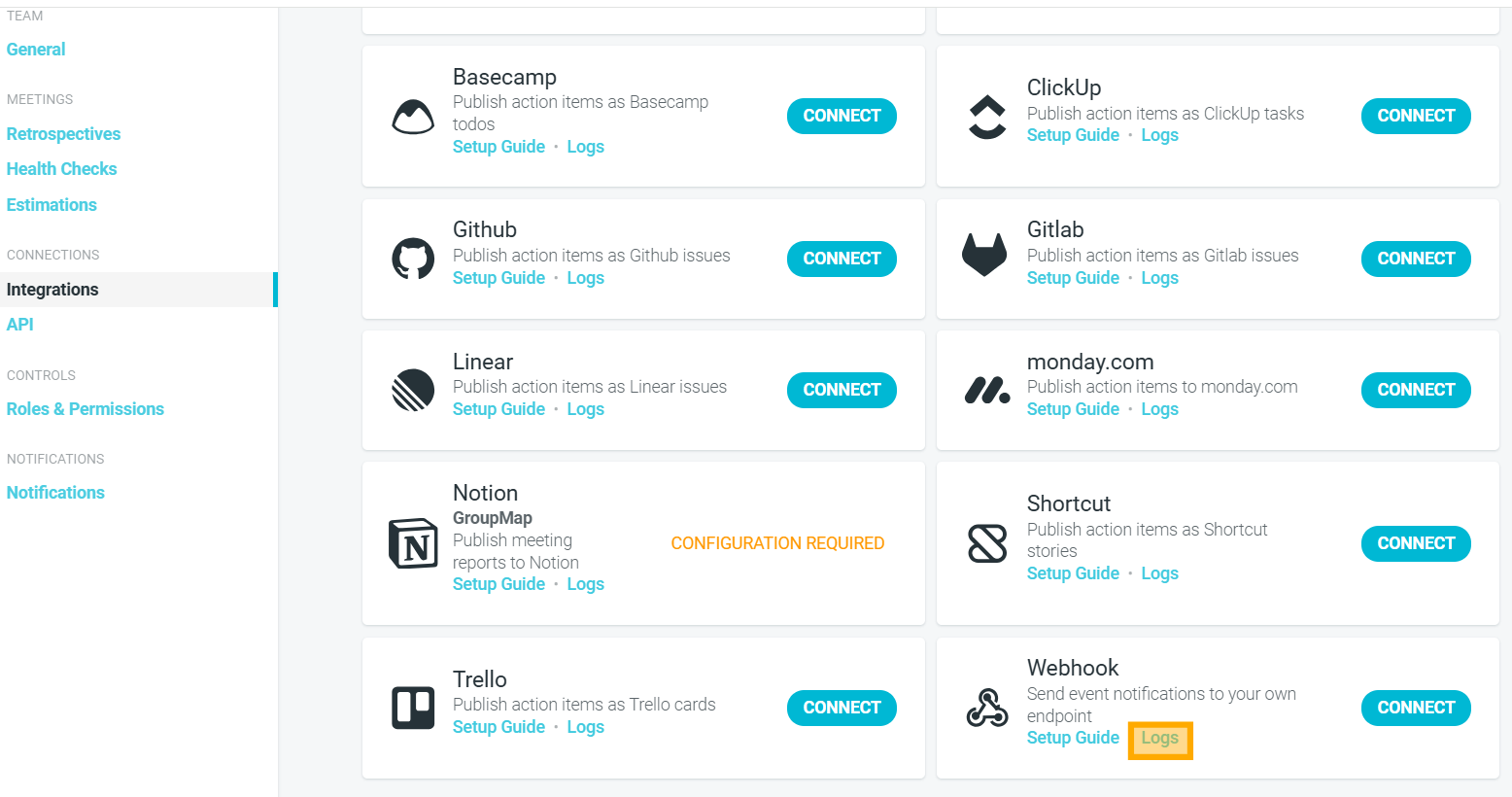
Integration logs are retained for 30 days.